![Lock Up.svg]](https://support.iris.tv/hubfs/Lock%20Up.svg)
This documentation is a slight modification of the IRIS.TV Asset Push API and Sending Contextual Segments with the Asset Push API documentation pages.
Asset Push API Call
IRIS.TV will accept assets sent via HTTPS POST request to the base URL that follows, and requires several query parameters and headers for the content to be accepted.
<https://api.iris.tv/publisher/asset>
CURL STATEMENT
curl -H 'Content-Type: application/json' -H 'X-Iris-Content-Source: <Content Source>'
-X POST https://api.iris.tv/publisher/asset?access_token=<access_token>&client_token=<client_token> -d '

{

     "AssetID": "This must be a unique ID among your assets",
     "field1": "example1",

"field2": "example2"

}'
Understanding and Creating the Initial Live Stream Asset
First Asset Send
For each piece of live content, a FIRST asset must be sent containing asset-level data. This FIRST asset should NOT contain any scene level data.
This data can be sent as early as you receive the data all the way up to the start of the asset. Earlier is recommended, but not required.
Query parameters
The following query parameters are required and may be found in the platform.iris.tv > settings > properties:
- access_token: token assigned by IRIS.TV to the publishers parent account (parent media company)
- client_token: token assigned by IRIS.TV to the publishers child account (site, app or channel)
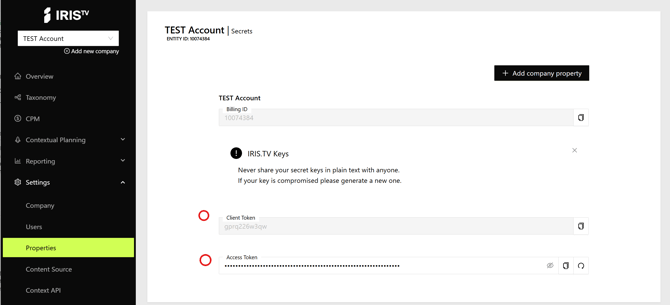
Body parameters
This will be a POST request. We recommend that the body be formatted in either JSON or XML.
The exact format for its contents can either conform to the asset sample in Standard Content Feed Ingestion or your existing format.
-
GUID is a required field in the request body
-
segments is a required field in the request body
-
X-Iris-Content-Source is a required header
- Start Time is a required field
suggested fields for a sports asset:
- Scheduled Start Time
- Scheduled End Time
- Sport
- League
- Teams
- Athletes
- Location
- Gametime: quarter, period, coin flip
- Game type: in-season, playoff, exhibition
The following HTTP headers are accepted:
- Content-Type: This required header identifies the type of data which is sent in the body (e.g. application/json or application/xml)
- X-Iris-Content-Source: (Required) The exact name of the content source(s) configured for the assets to be sent.
Asset Push API Response
The API will respond with a JSON document.
API Success Case
HTTP response code will be 200, and the body will include the following values:
- success: This will be set to “true”
- iris_id: The IRIS ID for the request
- The IRIS ID will be formatted using the following format: iris_[asset-alphanum]
- context: This will be an array of encoded values for the segments sent to IRIS.TV
- Sample format of one segment ic_1234567 and is commonly referred to as IRIS_CONTEXT
API Failure Responses
In the case of a failure, the HTTP response code will indicate the type of error (examples below), and the body will have the field errors containing an array of strings identifying one or more errors which occurred during the processing of the request.
Fixing all the errors listed in the array does not guarantee a successful request, as new problems may be revealed by fixing existing ones.
Examples of HTTP response codes used by this endpoint
- 401 Unauthorized no access_token was provided, or an invalid access_token was provided.
- 403 Forbidden: no client_token was provided, an invalid client_token was provided, or the client_token does not grant access to the provided content source
- 400 Bad Request: the passed asset did not include an id or url, or it did not contain them at the location IRIS.TV | Video Data Connectivity expected based on your communication with your TAM
- 500 Internal Server Error: the IRIS.TV | Video Data Connectivity server encountered an error and could not process your asset. At the time of request, please retry.
- 503 Service Unavailable: The IRIS.TV | Video Data Connectivity server encountered an error and could not process your asset. At the time of request, please retry.
Tried the above but still having issues?
Please contact your technical account manager (TAM) with the details of the request which failed including the asset to be passed as well as the content source and tokens used to make the request, as well as the date and time when the request was made.
Example error responses from the API
{"errors": ["Missing access token"]}

{"errors": ["Missing client token"]}

{"errors": ["Could not find a content source by that name"]}

{"errors": ["Asset missing id" "Asset missing url"]}
First Asset Request Sample
Please note: in this sample the start date is sent as “publish_date” and “original_air_date” and the end date is sent as “expected_end_date”
REQUEST
IMPORTANT: no heartbeat time_stamp should be present on the FIRST asset call.
HTTP POST  https://api.iris.tv/publisher/asset?access_token=<your-access-token>&client_token=<your-client-token>

Content-Type: application/json\

X-Iris-Content-Source: content-feed-name-goes-here\

{

"guid": 5331690110001,

"title": "January 3rd Golden State Warriors at San Antonio",

"description": "Golden State Warriors play San Antonio Spurs at the Frost Bank Center",


  "dates"   :  {

             "publish_date" : 1753388000,
             "original_air_date" :1753388000,
             "expected_end_date" : 1750321100,
             "update_date" :  1753378000,
             "expiration_date" :  1754256800

             },

  "game_details": {

            "sport" : "Basketball",
            "league" :"NBA",
            "home_team" : "San Antonio Spurs",
            "away_team" : "Golden State Warriors",
            "game_type" : "In Season",

            "athletes" : ["Steph Curry", "Victor Webanyama"],
            "location" : "Frost Bank Center",

            },

"segments" : ["xx_spurs", "xx_","xx_nba", "xx_basketball"],
"language" : "English"

}
RESPONSE
200 HTTP OK

{

   "success": true,

   "video_info": {

       "iris_id": "iris_0eddd893d082e43",

       "context": [

           "ic_2328328",

           "ic_3801836",

           "ic_2404392"

       ]

   }

  }
Creating scene level data using “Heartbeats”
After creating the initial asset, you can then send scene-level data associated with a specific timecode.
Since this is a live event, we’re expecting to receive this data at scheduled intervals or “Heartbeats”. A Heartbeat response occurs at a regular interval such as every 5, 10, or 15, 20 or up to 60 seconds.
Start Time: game time converted to UTC in seconds
Example: 8:00 pm CDT is 1:00 AM UTC OR 3600 in seconds
response 1 -> heartbeat_timecode: 3615
response 2 ->heartbeat_timecode: 3630
response 3 ->heartbeat_timecode: 3645
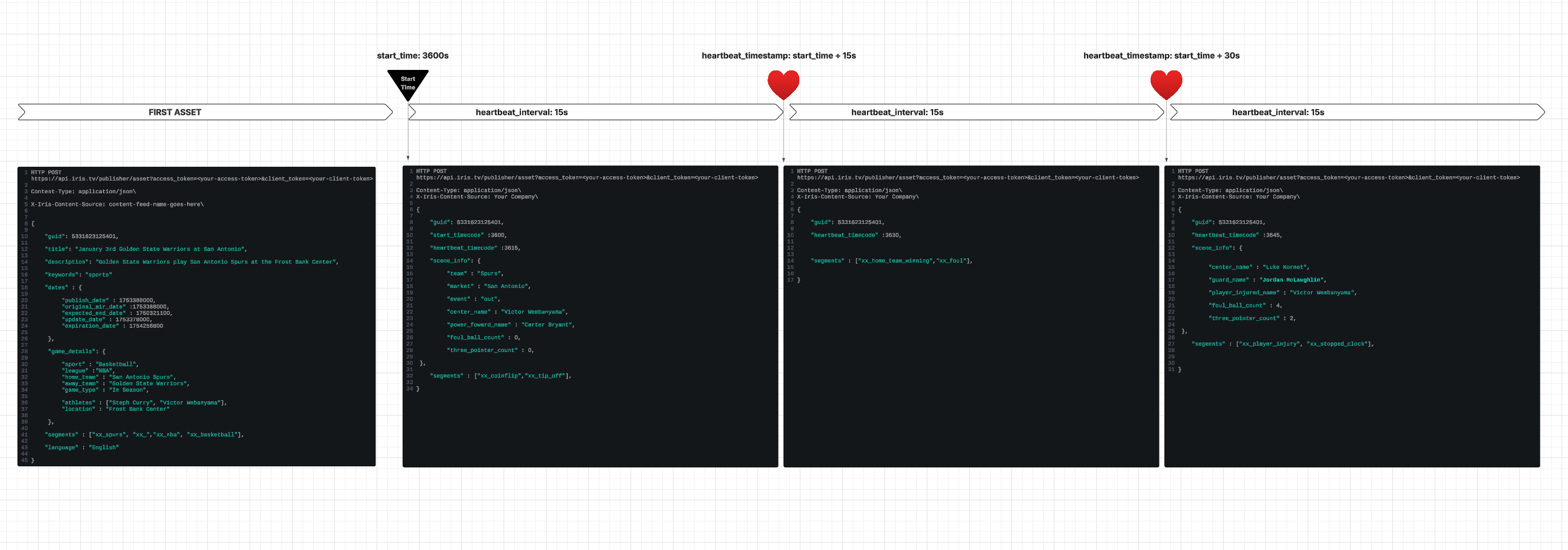
Each heartbeat request should include exactly the scene-level and asset-level segments contextually relevant to the time frame since the last heartbeat.
For example if a game is in the first period, then each heartbeat request is expected to include a segment identifying the first period and asset-level segments (e.g. teams in the game) until the next period is entered.
In the case of no segments or no change to existing segments, a heartbeat request with updated timecode is still expected.
Heartbeat (Scene Level) Query parameters
The following query parameters are required:
- access_token: token assigned to the publishers parent account (parent media company)
- client_token: token assigned to the publishers child account (site, app or channel)
Body parameters
The body of the POST request is recommended to be JSON or XML data.
The exact format for its contents can either conform to the asset sample in Standard Content Feed Ingestion or your existing format. This format must be the same as the initial asset request and should include:
GUID, timecode, and segments are three required fields
Here are suggested fields for the scene level heartbeat request:
- GUID: Identifies the asset by having the same value as one of the initial asset requests
- heartbeat_timecode: total number of seconds since the initial asset start time
- segments: All scene-level and asset-level segments to apply to this time frame, e.g. game period, scoring events, teams, etc
- metadata: Keywords from audio/video analysis of the stream
These new segments will be appended to the asset segments by IRIS.TV.
The following HTTP headers are accepted:
- Content-Type: This required header identifies the type of data which is sent in the body (e.g. application/json or application/xml)
- X-Iris-Content-Source: The exact name of each content source configured for the assets to be sent.
Asset Push API Responses
The API will respond with a JSON document.
Asset Push API Success Response
In the case of a success, the HTTP response code will be 200, and the body will include the following values:
- success: This will be set to “true”
- iris_id: The IRIS ID for the request
- This will be the Extended IRIS ID and will be formatted using the following format: iris_[contentID]_v[num]_[sceneID]
- context: This will be an array of encoded values for the segments sent to IRIS.TV
- Sample format of one segment ic_1234567
- This will is commonly referred to as IRIS_CONTEXT
Asset Push API Failure Responses
In the case of a failure, the HTTP response code will indicate the type of error (examples below), and the body will have the field errors containing an array of strings identifying one or more errors which occurred during the processing of the request.
Fixing all the errors listed in the array does not guarantee a successful request, as new problems may be revealed by fixing existing ones.
Examples of HTTP response codes used by this endpoint:
- 401 Unauthorized: no access_token was provided, or an invalid access_token was provided.
- 403 Forbidden: no client_token was provided, an invalid client_token was provided, or the client_token does not grant access to the provided content source
- 400 Bad Request: the passed asset did not include an id or url, or it did not contain them at the location IRIS.TV | Video Data Connectivity expected based on your communication with your TAM
- 500 Internal Server Error: the IRIS.TV | Video Data Connectivity server encountered an error and could not process your asset. At the time of request, please retry.
- 503 Service Unavailable: The IRIS.TV | Video Data Connectivity server encountered an error and could not process your asset. At the time of request, please retry.
Above not working?
Please contact your technical account manager (TAM) with the details of the request which failed including the asset to be passed as well as the content source and tokens used to make the request, as well as the date and time when the request was made.
Example responses from the API:
{"errors": ["Missing access token"]}

{"errors": ["Missing client token"]}

{"errors": ["Could not find a content source by that name"]}

{"errors": ["Asset missing id" "Asset missing url"]}
Example for Review:
MANDATORY ONBOARDING STEP
You must send a sample asset to your technical account manager before sending any assets so IRIS.TV can configure the API to accept your data.
NOTE: Before sending assets, please send a sample asset to your technical account manager so IRIS.TV can configure the API to accept your data.
REQUEST
First Heartbeat Response
RECOMMENDATION: Include all contextually relevant scene level segments to be targeted for the next ad pod; these segments will be combined with the asset level segments from the first asset request. Inversely, the "xx_coinflip" segment should likely "roll-off" when no longer relevant to the next ad pod.
HTTP POST https://api.iris.tv/publisher/asset?access_token=<your-access-token>&client_token=<your-client-token>
Content-Type: application/json\
X-Iris-Content-Source: content-feed-name-goes-here\


{


    "guid": 5331623125401,


    "start_timecode" :3600,


    "heartbeat_timecode" :3615,


    "scene_info": {


       "team" : "Spurs",


       "market" : "San Antonio",


       "event" : "out",


       "center_name" : "Victor Wembanyama",


       "power_foward_name" : "Carter Bryant",


       "foul_ball_count" : 0,


       "three_pointer_count" : 0
    },


"segments" : ["xx_coinflip","xx_tip_off"]

}
RESPONSE WITH EXTENDED IRIS ID
The extended IRIS ID will be formatted using the following format: iris_[asset-alphanum]_v[number]_[timestamp-alphanum]
200 HTTP OK

{

   "success": true,

   "video_info": {

       "iris_id": "iris_0ecbbf893d082e43_v2_jansdf01231",

       "context": [

           "ic_2678328",

           "ic_3803336"

       ]

   }

 }